
Contacts
Contacts represent all individuals and organisations associated with the OMC — unit owners, residents, directors, solicitors, accountants and any other party with a role in the development. Because an OMC contact may be a company rather than an individual, the system uses the term “Contact” rather than “Person”.
Each contact can be linked to one or more units through ownership or residency roles, and may have multiple roles across different OMCs. The contact record stores communication preferences, email history, associated contacts (e.g. a company with a named representative), and a full audit trail of mailings sent.
Built-in views let you filter the contact list by role — current members, directors, past participants, suppliers and more.
List View
Section titled “List View”
| Column | Type | Description |
|---|---|---|
| Title | picklist | Salutation title for this contact (e.g. Mr, Ms, Dr). |
| First Name | text | The contact's first or given name. |
| Last Name | text | The contact's last name or family name. |
| Telephone | phone | Primary telephone number for this contact. |
| Email address used for portal access and correspondence. | ||
| Mail Status | picklist | The email deliverability status for this contact's address. Indicates if emails are being received, bouncing, or if the contact has opted out. |
| Entity Type | picklist | Whether this contact is an individual person or an organisation such as a company or trust. |
| Contact Type | picklist | The relationship type of this contact to the OMC — for example Owner, Director, Solicitor, or Supplier. |
| Primary Contact | link | For organisation contacts, the named individual who is the primary point of contact. |
| Mailing Address | longText | Postal mailing address for this contact. Used when sending statements or correspondence by post. |
| User Name | text | The portal login username for this contact. Set when the contact registers for portal access. |
| Notes | longText | Internal notes about this contact, visible only to management team members. |
| Units | grid | Units associated with this contact, including their role and start/end dates. |
| statusField | icon | Current ownership or membership status indicator. |
| Unit | link | The unit this contact is associated with. |
| Role | link | The role this contact holds for this unit (e.g. Owner, Resident). |
| From | date | The date this person's association with the unit began. |
| Until | date | The date this person's association with the unit ended. |
| Notes | longText | Notes about this unit relationship. |
| Associated Contacts | grid | Other contacts linked to this contact, typically members of the same household or organisation. |
| Person Name | link | Name of the associated contact. |
| Telephone | phone | Phone number of the associated contact. |
| Email of the associated contact. | ||
| Notes | longText | Notes about this association. |
Detail View
Section titled “Detail View”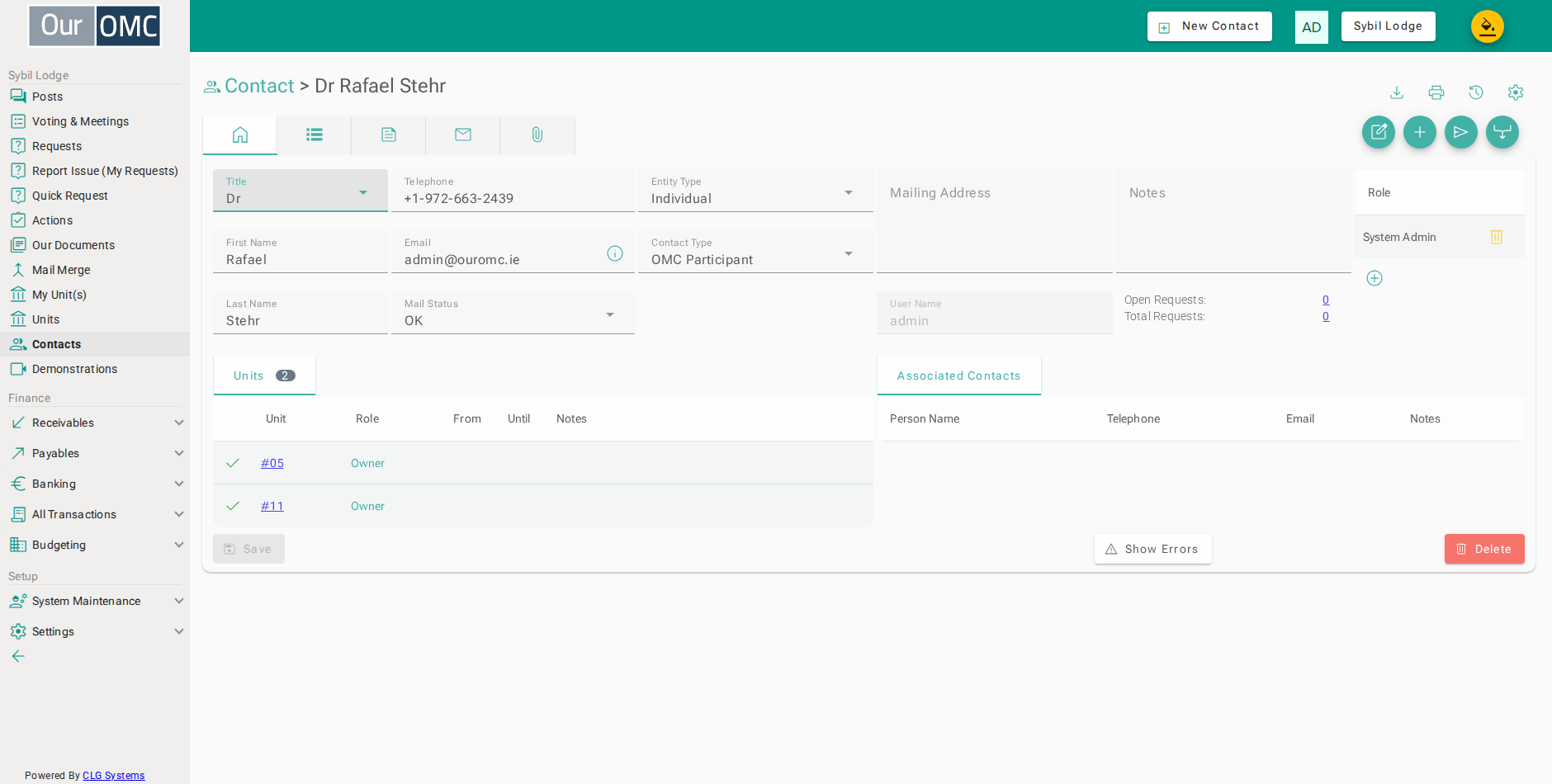
| Field | Type | Description |
|---|---|---|
| Title | picklist | Salutation title for this contact (e.g. Mr, Ms, Dr). |
| First Name | text | The contact's first or given name. |
| Last Name | text | The contact's last name or family name. |
| Telephone | phone | Primary telephone number for this contact. |
| Email address used for portal access and correspondence. | ||
| Mail Status | picklist | The email deliverability status for this contact's address. Indicates if emails are being received, bouncing, or if the contact has opted out. |
| Entity Type | picklist | Whether this contact is an individual person or an organisation such as a company or trust. |
| Contact Type | picklist | The relationship type of this contact to the OMC — for example Owner, Director, Solicitor, or Supplier. |
| Primary Contact | link | For organisation contacts, the named individual who is the primary point of contact. |
| Mailing Address | longText | Postal mailing address for this contact. Used when sending statements or correspondence by post. |
| User Name | text | The portal login username for this contact. Set when the contact registers for portal access. |
| Notes | longText | Internal notes about this contact, visible only to management team members. |
| Open Requests | link | Number of currently open service requests linked to this contact. |
| Total Requests | link | Total number of service requests ever linked to this contact. |
| Units | grid | Units associated with this contact, including their role and start/end dates. |
| statusField | icon | Current ownership or membership status indicator. |
| Unit | link | The unit this contact is associated with. |
| Role | link | The role this contact holds for this unit (e.g. Owner, Resident). |
| From | date | The date this person's association with the unit began. |
| Until | date | The date this person's association with the unit ended. |
| Notes | longText | Notes about this unit relationship. |
| Roles | grid | Non-unit roles assigned to this contact, such as Director or Accountant. |
| Role | picklist | The role assigned to this contact. |
| icon | Click to remove item from list | |
| Associated Contacts | grid | Other contacts linked to this contact, typically members of the same household or organisation. |
| Person Name | link | Name of the associated contact. |
| Telephone | phone | Phone number of the associated contact. |
| Email of the associated contact. | ||
| Notes | longText | Notes about this association. |
Available Actions
Section titled “Available Actions”| Action | Description |
|---|---|
Edit Email Address | |
Associate Contact | Create a new contact associated to this contact |
Create Request | |
Send Email | |
Merge | Merge this person record and all related data into another person record |
Related Tabs
Section titled “Related Tabs”| Main | Shows the main form fields as described above | |
| Actions | Scheduled to-do actions related to this contact. | |
| Notes | Notes and discussion threads about this contact. | |
| Mailings | Emails sent to this contact from the system. | |
| Attached Files | Files attached to this contact record. |
Actions
Scheduled to-do actions related to this contact.
Notes
Notes and discussion threads about this contact.
Mailings
Emails sent to this contact from the system.
| Field | Type | Description |
|---|---|---|
| From | text | The sender email address. |
| To | text | The recipient email address. |
| Class | text | The type or class of this email. |
| Subject | link | The subject line of the email. |
| Sent | dateTime | The date and time this email was sent. |
| Size | text | The size of the email message. |
| Status | number | The HTTP response code from the mail server. |
| Attached | number | Number of files attached to this email. |
| Status Text | picklist | The delivery status of this email. |
Attached Files
Files attached to this contact record.