
OMC Settings
OMC Settings holds the identity and operational defaults for a single Owners Management Company. Most of these values are set when the OMC is first created and rarely need to change, but it is important to get the key fields right — particularly Name and Legal Name.
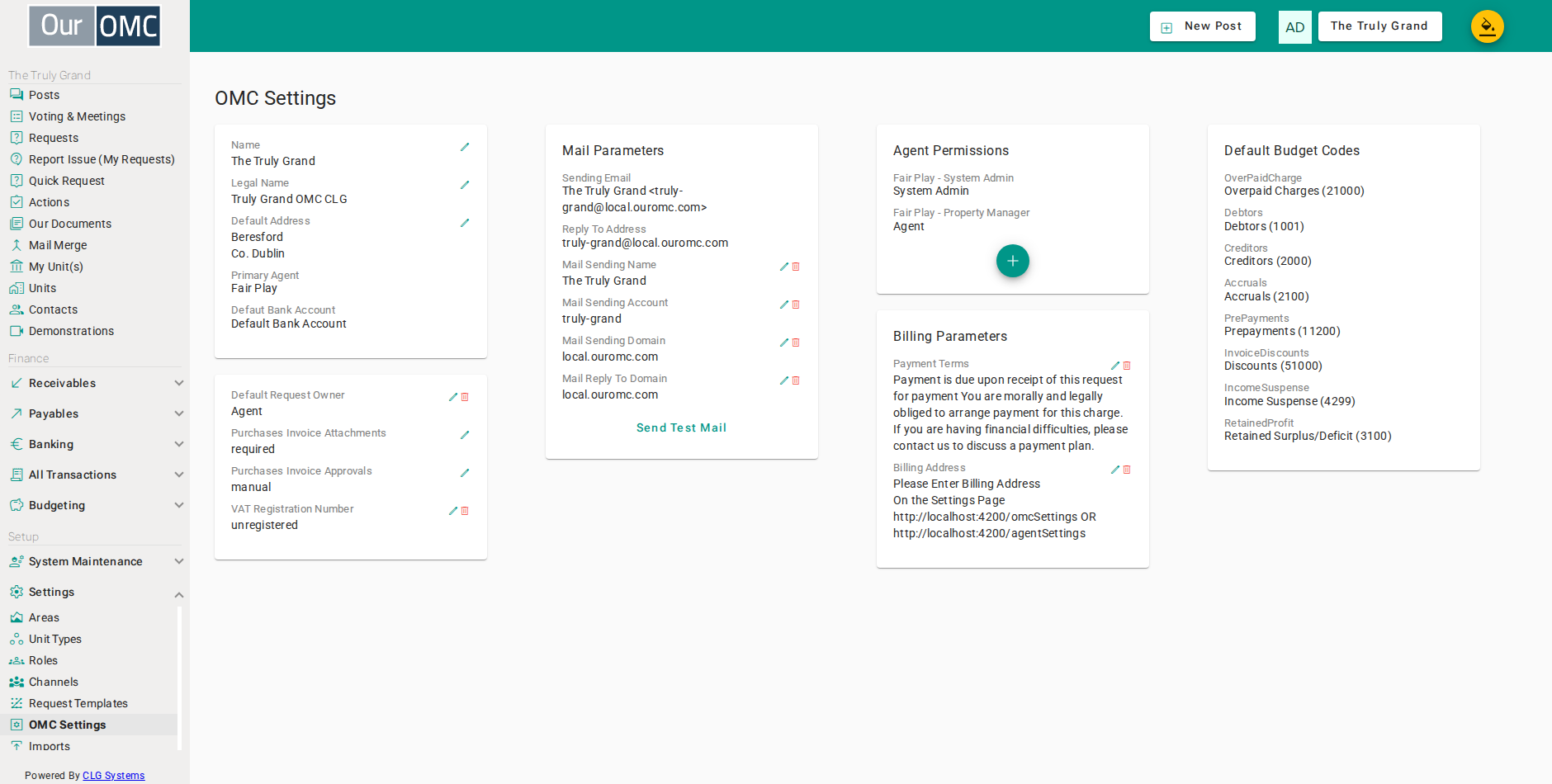
Name and Legal Name
Section titled “Name and Legal Name”These two fields serve distinct purposes and both must be accurate.
Name is the short working name of the OMC (e.g. “Truly Grand OMC”). It is used in:
- Invoice emails: “Sent by [Agent Name] on behalf of [OMC Name]”
- The
[omcName]token available in all communication templates
Legal Name is the formal registered name of the company (e.g. “Truly Grand OMC CLG”). It appears prominently on every document the OMC issues to its members:
- The
<h1>heading at the top of every PDF document the OMC produces - The PDF footer: “On Behalf of the members of [OMC Legal Name]”
- The payee line on every invoice PDF: “Payee: [OMC Legal Name]”
- The payee line on every statement — full, short, and merged formats
- The
[legalName]token in communication templates - The Bank Reconciliation page title (shown in brackets)
- The Join an OMC dropdown when a contact connects their account to an OMC
The legal name is the payee name on invoices. If it is wrong, contacts are making payments to the wrong entity name. It must match the OMC’s Companies Registration Office name exactly.
Default Address and Primary Agent
Section titled “Default Address and Primary Agent”Default Address is the OMC’s contact address shown on correspondence. Primary Agent is read-only — it shows which agency currently manages this OMC and is set when the agent relationship is configured.
Operational Settings
Section titled “Operational Settings”- Default Bank Account — the bank account used by default for new transactions
- Default Request Owner — the team member who owns new service requests unless a category rule overrides it. Remove the override with the bin icon to revert to the agent default.
- Purchases Invoice Attachments — controls whether purchase invoice attachments are required or optional
- Purchases Invoice Approvals — controls the approval workflow for purchase invoices
- VAT Registration Number — the OMC’s VAT number, printed on relevant documents
Billing Parameters
Section titled “Billing Parameters”Payment Terms and Billing Address in the Billing Parameters card work as OMC-level overrides. When not set here, the OMC inherits the values configured on the agent’s Agent Settings page.
When a value is overridden at the OMC level it appears in bold to indicate it differs from the agent default. Click the bin icon to remove the override and revert to the agent default.
Agent Permissions
Section titled “Agent Permissions”The Agent Permissions card lists all agents that have been granted access to this OMC, along with their role on this OMC. Use the + button to invite an additional agent. Roles control what each agent can see and do within this OMC.
Mail Settings
Section titled “Mail Settings”The Mail Parameters card mirrors the equivalent section on Agent Settings. When not overridden here, the OMC uses the sending configuration from the agent. Overridden values are shown in bold.
Editing the mail sending domain fields requires Uber access. See Agent Settings for details on configuring a custom sending domain.
AI Level
Section titled “AI Level”The AI Level controls how much the AI assistant does on this OMC’s requests. When it is not set here, the OMC uses the level set by your managing agent on Agent Settings. If neither has set a level, Review is used. A value set here overrides the agent’s default and is shown in bold.
- None — no AI functions.
- Review (the default) — no AI responses are sent automatically. Users are offered the AI’s response to accept, change or reject.
- Triage — AI classifications are applied and first responses are sent automatically on newly created requests. Review stays available for everything else.
Comments written by the AI appear under the name OurOMC Assistant.