
OMC List
The OMC List provides a high-level overview of all Owners Management Companies managed by your agency. Each row shows key health indicators for an OMC — open requests, outstanding to-dos, days of cash on hand, last reconciliation date, and current budget cycle status.
The sparkline columns (Weekly and Monthly analysis) give a quick visual of request volumes over time, making it easy to spot which OMCs are busy and which may need attention. The view can be filtered to show only your own OMCs, those you manage or administer, or all active OMCs across the agency.
List View
Section titled “List View”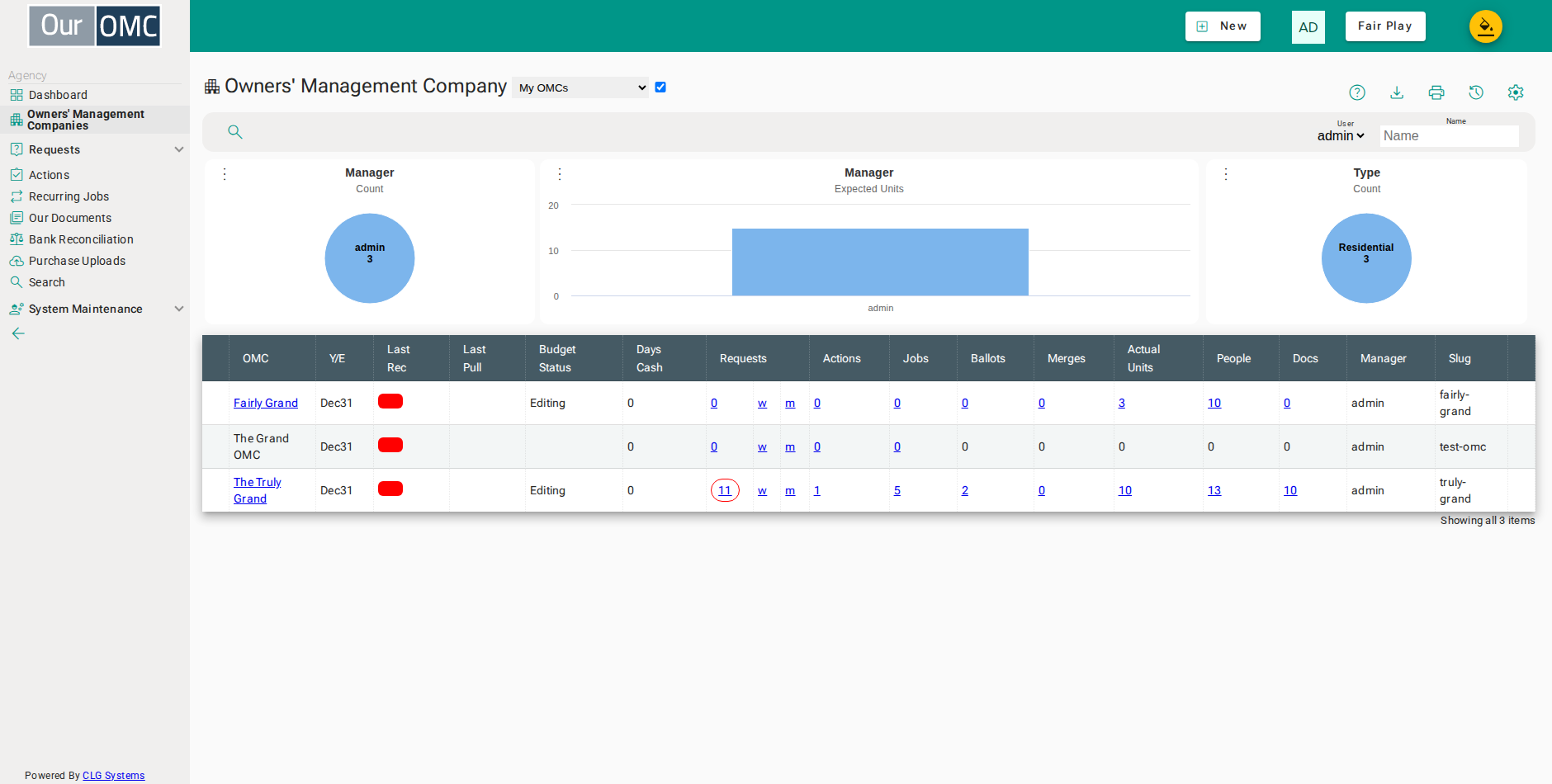
| Column | Type | Description |
|---|---|---|
| OMC | link | The name of the OMC — click to open the full OMC detail record. |
| Y/E | text | The financial year-end date for this OMC, shown as day/month (e.g. 31/12). |
| Last Rec | date | The date of the most recent bank reconciliation completed for this OMC. |
| Last Pull | dateTime | The date and time of the last automatic bank balance pull for this OMC. |
| Budget Status | picklist | The status of the current budget cycle — indicates whether the budget is still being edited, proposed, approved, or fully billed. |
| Days Cash | number | The number of days of operating expenses covered by the current bank balance — a quick indicator of short-term financial health. |
| Requests | link | The number of open service requests for this OMC — click to view them. |
| weekly_analysis | link | A link to a weekly activity summary for this OMC. |
| monthly_analysis | link | A link to a monthly activity summary for this OMC. |
| Actions | link | The number of outstanding to-do actions logged against this OMC — click to view them. |
| Jobs | link | The number of recurring jobs scheduled for this OMC — click to view them. |
| Ballots | link | The number of ballots or votes recorded for this OMC — click to view them. |
| Merges | link | The number of mail merge runs completed for this OMC — click to view them. |
| Actual Units | link | The actual number of units currently set up for this OMC — click to view them. |
| People | link | The number of contacts (owners, residents and keyholders) registered for this OMC — click to view them. |
| Docs | link | The number of documents stored for this OMC — click to view them. |
| Manager | picklist | The team member responsible for managing this OMC. |
| Slug | text | The unique URL-friendly identifier for this OMC, used in the owner portal login address. |
Detail View
Section titled “Detail View”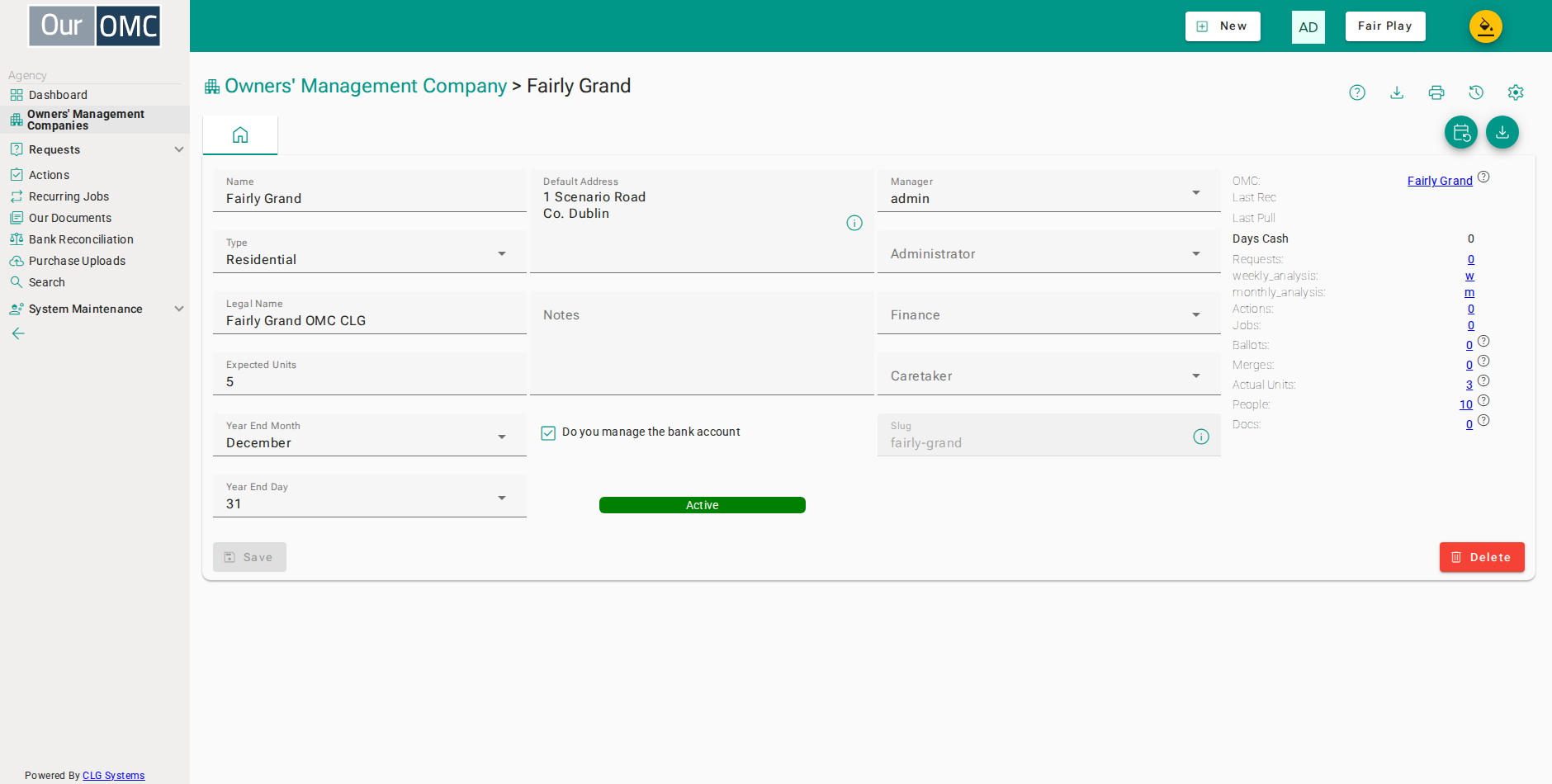
| Field | Type | Description |
|---|---|---|
| OMC | link | The name of the OMC — click to open the full OMC detail record. |
| Name | text | The short name used to identify this OMC within the system. |
| Last Rec | date | The date of the most recent bank reconciliation completed for this OMC. |
| Last Pull | dateTime | The date and time of the last automatic bank balance pull for this OMC. |
| Days Cash | number | The number of days of operating expenses covered by the current bank balance — a quick indicator of short-term financial health. |
| Type | picklist | The type of development — Residential, Commercial & Residential, or Commercial. |
| Legal Name | text | The full registered legal name of this OMC, as it appears on official documents. |
| Default Address | longText | The default correspondence address for this OMC, used on invoices and letters. |
| Notes | longText | Internal notes about this OMC, visible only to management agency staff. |
| Do you manage the bank account | boolean | Indicates whether the management agency handles the bank account directly for this OMC. |
| Active | pill | Whether this OMC is currently active — inactive OMCs are shown in the Archived OMCs view. |
| Requests | link | The number of open service requests for this OMC — click to view them. |
| weekly_analysis | link | A link to a weekly activity summary for this OMC. |
| monthly_analysis | link | A link to a monthly activity summary for this OMC. |
| Actions | link | The number of outstanding to-do actions logged against this OMC — click to view them. |
| Jobs | link | The number of recurring jobs scheduled for this OMC — click to view them. |
| Ballots | link | The number of ballots or votes recorded for this OMC — click to view them. |
| Merges | link | The number of mail merge runs completed for this OMC — click to view them. |
| Expected Units | number | The total number of units expected in this development, used as a reference when setting up the OMC. |
| Year End Month | picklist | The month in which this OMC's financial year ends. |
| Year End Day | picklist | The day of the month on which this OMC's financial year ends. |
| Actual Units | link | The actual number of units currently set up for this OMC — click to view them. |
| People | link | The number of contacts (owners, residents and keyholders) registered for this OMC — click to view them. |
| Docs | link | The number of documents stored for this OMC — click to view them. |
| Manager | picklist | The team member responsible for managing this OMC. |
| Administrator | picklist | The team member responsible for administration of this OMC. |
| Finance | picklist | The team member responsible for the finances of this OMC. |
| Caretaker | picklist | The caretaker or on-site contact assigned to this OMC. |
| Slug | text | The unique URL-friendly identifier for this OMC, used in the owner portal login address. |
Available Actions
Section titled “Available Actions”| Action | Description |
|---|---|
Add Recurring Jobs | |
Download Template | Download an Excel template pre-filled with your OMC details |
Complete Setup | After creating an OMC, press this action button to actually create the organisation and start loading data. Ensure that you have the correct financial year end dates set, as it is very cumbersome to change these afterwards. This action is only visible before the setup has been completed. |