
How Requests Work
Requests are the things an OMC needs done — maintenance jobs, queries from contacts, tasks raised in meetings. No matter how a request comes in, it follows the same lifecycle and is tracked in the same place.
How Requests Are Created
Section titled “How Requests Are Created”- Managers can create requests directly through the UI
- Directors, owners and contacts can log in to omcCommunity and raise requests themselves
- Email — every OMC has its own email address, and any email received at that address automatically becomes a request. The sender is added as a follower and receives an acknowledgement with the reference number.
- Ballots & Meetings — requests can be created during AGMs and directors meetings
Simple Request Flow
Section titled “Simple Request Flow”For straightforward requests that can be resolved immediately, the flow is short:

- Open — the request arrives and is visible to the assigned agent
- Resolved — the agent provides the answer or completes the work and closes the request. All followers are notified automatically.
- Accepted — the requester reviews the resolution and accepts it. Once accepted, the request is fully closed and cannot be reopened.
If the requester does not respond within 7 days, the request is automatically accepted.
Requests and Actions
Section titled “Requests and Actions”Most requests require more than one step. Actions let you plan and track the work needed to close a request without losing visibility of what still needs to happen.
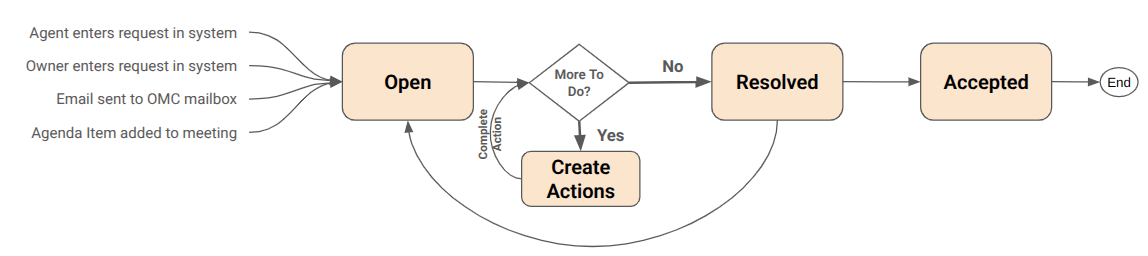
For example: a contact reports a broken roof slate. You cannot close the request yet because the roofer has not been out, but you do not want it sitting unattended. You create two actions: call roofer — due today and confirm repair completed — due next Friday. The request stays open and planned, the actions keep it on your radar, and once both are done you close the request as normal.
Actions have a title, a planned date and an owner. The planned date of the earliest uncompleted action drives the request’s action status (Planned or Overdue), so overdue actions surface automatically on the dashboard. See Request Status for the full status breakdown.
Remembering to Charge Out
Section titled “Remembering to Charge Out”When a third-party contractor does the work their invoice acts as a natural prompt to raise a charge. For work done by your own team it is easy to forget. The billing field on a request exists for exactly this — it flags whether a charge needs to be raised, and to whom (the OMC or a unit owner). See the Service Requests page for the billing field values.
