
Schedules
Schedules define the groups of units that share service charge costs together and how those costs are divided between them. Most OMCs have two or more schedules — for example an Estate Charges schedule covering all units equally, and an Apartment Charges schedule covering only apartment units proportionally by floor area.
Each schedule has a charge type that determines how the total cost is split between units:
- Equal Fixed Charge — every unit in the schedule pays the same amount.
- Proportional By Size — each unit pays in proportion to its floor area in m² or feet² The unit does not matter, as long as all units use the same unit to show their size.
- By Type and/or Category — units are grouped by type and category, with a fixed portion per unit within each group.
- Custom Proportion — each unit has an individually assigned portion value.
- Proportional By Car Spaces — each unit pays in proportion to its number of car spaces.
- Proportional By Bedrooms — each unit pays in proportion to its number of bedrooms.
Criteria and Apportionment
Section titled “Criteria and Apportionment”The Criteria section defines which units are included in or excluded from the schedule, using combinations of unit type and category. For By Type schedules, a portion value per unit is also set here. If no criteria are configured, all units are included.
The Unit Apportionment section shows the calculated per-unit allocation — each unit’s portion and the resulting percentage share of the total charge. These records are generated automatically from the criteria and are what drives the invoice amounts when billing is run.
Schedules are linked from budget codes (which allocate a percentage of each code’s budget to each schedule) and from billing runs (which raise invoices based on the apportionment percentages). The budget report also uses schedule apportionment to explain to members how costs will be shared.
List View
Section titled “List View”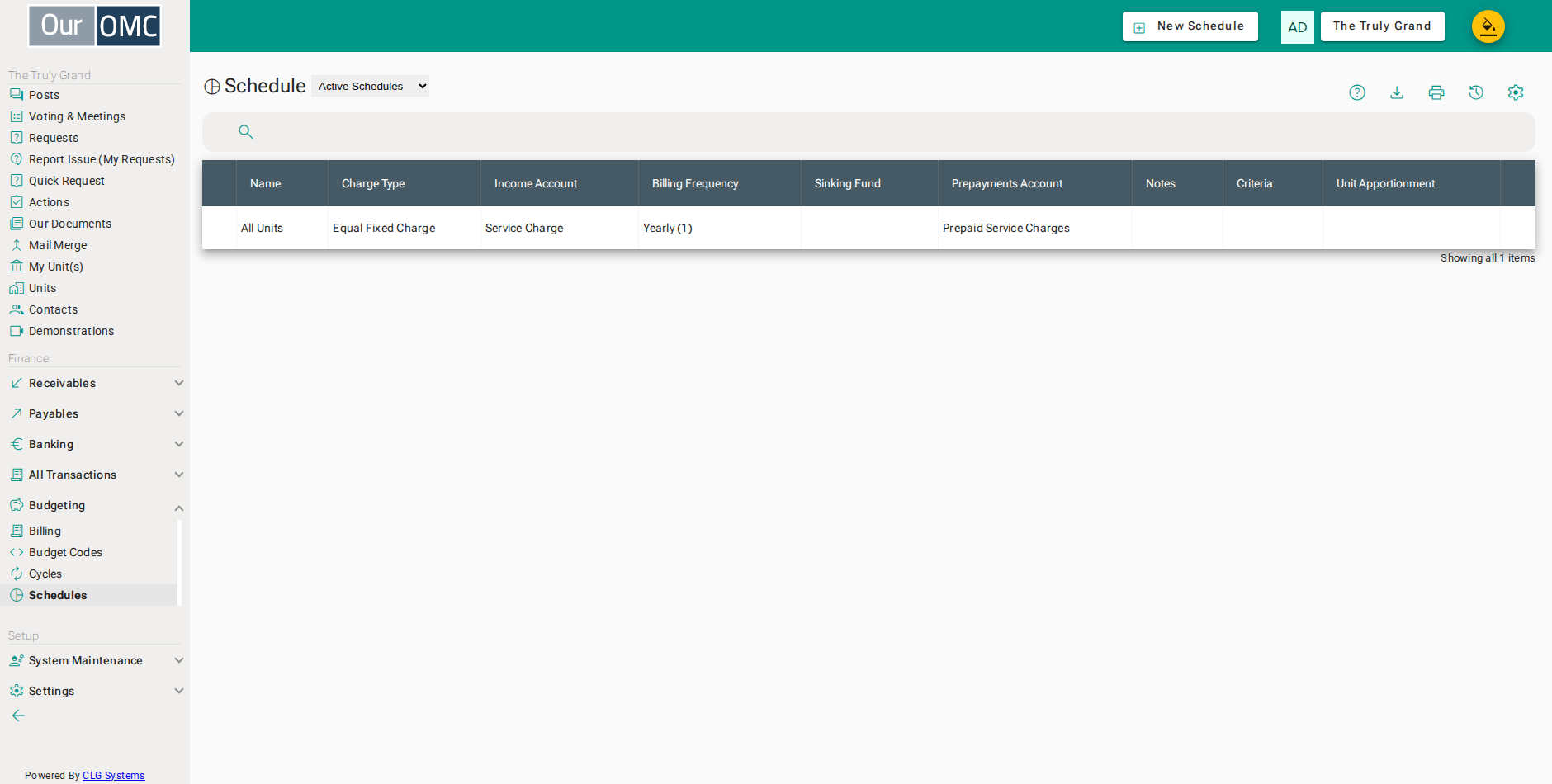
| Column | Type | Description |
|---|---|---|
| Name | text | Name of this schedule (e.g. Estate Charges, Apartment Charges), as it will appear on invoices and budget reports. |
| Charge Type | picklist | Determines how costs are shared between units — equal fixed charge, proportional by floor area, by bedroom count, by car spaces, by unit type and category, or a custom proportion per unit. |
| Income Account | picklist | The income budget code to which service charge receipts are posted when units pay their bills. |
| Billing Frequency | picklist | How often charges in this schedule are billed to unit owners — typically Annually. |
| Sinking Fund | boolean | When enabled, funds collected under this schedule are treated as sinking fund (capital reserve) contributions rather than service charge income. |
| Prepayments Account | picklist | The balance sheet account used to hold prepaid amounts or overpayments pending allocation to the income account. |
| Notes | longText | Internal notes about this schedule, visible only to managers. |
| Criteria | grid | Rules that define which units are included in or excluded from this schedule, using unit type and category combinations. If no criteria are set, all units are included. |
| Type | picklist | The unit type this criterion applies to (e.g. Apartment, House, Commercial). |
| Category | picklist | An optional unit category to further filter matching units within the selected type (e.g. 1-Bed, 2-Bed) — leave blank to match all units of the specified type. |
| Include | boolean | When enabled, units matching this criterion are included in the schedule; when disabled, matching units are excluded. |
| Portion Per Unit | number | For By Type schedules, the number of portions allocated to each unit matching this criterion, which determines their proportional share of the total charge. |
| Unit matches | number | The number of units currently matching this criterion (calculated automatically). |
| Total Portions | number | The total portions contributed by units matching this criterion (calculated automatically). |
| icon | Click to remove item from list | |
| Unit Apportionment | grid | The per-unit apportionment records showing each unit's allocated portion and resulting share of the total charge. These are generated automatically based on the schedule criteria and charge type. |
| Id | number | |
| Unit | link | The unit assigned to this apportionment record. |
| Type | text | The type of the unit (e.g. Apartment, Commercial). |
| Category | text | The category of the unit (e.g. 1-Bed, 2-Bed). |
| Owner | link | The current owner of the unit. |
| Portion | number | The measure assigned to this unit — floor area in m², number of bedrooms or car spaces, or a custom value, depending on the schedule's charge type. |
| Percent | number | This unit's share of the total schedule charge as a percentage, calculated from its portion relative to the schedule total. |
Detail View
Section titled “Detail View”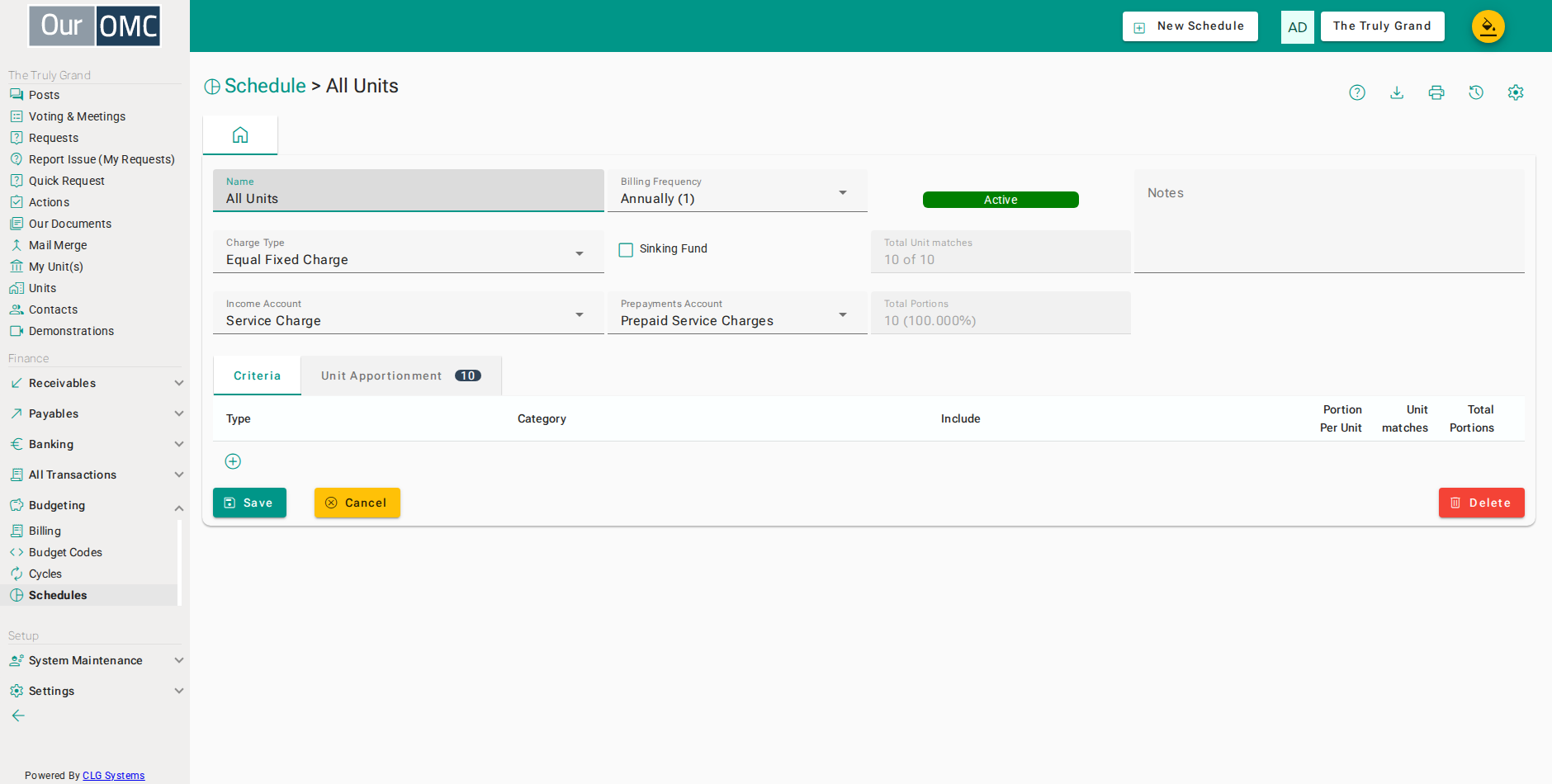
| Field | Type | Description |
|---|---|---|
| Name | text | Name of this schedule (e.g. Estate Charges, Apartment Charges), as it will appear on invoices and budget reports. |
| Charge Type | picklist | Determines how costs are shared between units — equal fixed charge, proportional by floor area, by bedroom count, by car spaces, by unit type and category, or a custom proportion per unit. |
| Income Account | picklist | The income budget code to which service charge receipts are posted when units pay their bills. |
| Billing Frequency | picklist | How often charges in this schedule are billed to unit owners — typically Annually. |
| Sinking Fund | boolean | When enabled, funds collected under this schedule are treated as sinking fund (capital reserve) contributions rather than service charge income. |
| Prepayments Account | picklist | The balance sheet account used to hold prepaid amounts or overpayments pending allocation to the income account. |
| Active | pill | Indicates whether this schedule is active and included in billing runs — inactive schedules are shown in the Archived Schedules view. |
| Total Unit matches | text | The total number of units currently matched by this schedule's criteria — useful as a sanity check when configuring the schedule. |
| Total Portions | text | The sum of all portions across matched units, used to calculate each unit's percentage share of the total charge. |
| Notes | longText | Internal notes about this schedule, visible only to managers. |
| Criteria | grid | Rules that define which units are included in or excluded from this schedule, using unit type and category combinations. If no criteria are set, all units are included. |
| Type | picklist | The unit type this criterion applies to (e.g. Apartment, House, Commercial). |
| Category | picklist | An optional unit category to further filter matching units within the selected type (e.g. 1-Bed, 2-Bed) — leave blank to match all units of the specified type. |
| Include | boolean | When enabled, units matching this criterion are included in the schedule; when disabled, matching units are excluded. |
| Portion Per Unit | number | For By Type schedules, the number of portions allocated to each unit matching this criterion, which determines their proportional share of the total charge. |
| Unit matches | number | The number of units currently matching this criterion (calculated automatically). |
| Total Portions | number | The total portions contributed by units matching this criterion (calculated automatically). |
| icon | Click to remove item from list | |
| Unit Apportionment | grid | The per-unit apportionment records showing each unit's allocated portion and resulting share of the total charge. These are generated automatically based on the schedule criteria and charge type. |
| Id | number | |
| Unit | link | The unit assigned to this apportionment record. |
| Type | text | The type of the unit (e.g. Apartment, Commercial). |
| Category | text | The category of the unit (e.g. 1-Bed, 2-Bed). |
| Owner | link | The current owner of the unit. |
| Portion | number | The measure assigned to this unit — floor area in m², number of bedrooms or car spaces, or a custom value, depending on the schedule's charge type. |
| Percent | number | This unit's share of the total schedule charge as a percentage, calculated from its portion relative to the schedule total. |
Available Actions
Section titled “Available Actions”| Action | Description |
|---|---|
Change Charge Type | Unlock the charge type so that it can be changed |
Edit Portions | Unlock the portions on this custom schedule so they can be edited |
Validate Schedule | Check the apportionment is still in step with the current unit data |