
Request Analysis by User
Request Analysis by User shows how the work across your managed OMCs is shared out among your team. For each user it shows their open backlog of requests and actions, and how many requests and actions they closed, and the time they spent, in the chosen week or month. An arrow beside each closed figure shows whether it is up or down on the period before; hover over the arrow to see the change and the previous figure. This report is only available to administrators.
Open work counts towards the user who owns it; closed work counts towards the user who closed it. Anyone outside your agency team who closed work, such as an OMC director, is combined into a single “Other users” row.
Every figure links to the list of requests or actions that make it up. For a week, clicking Time Spent instead shows that time day by day for each OMC, counted on the day each action was completed, with a link through to the actions themselves. Click By OMC on a user to see the same figures for that user broken down by OMC, with the OMC where they closed the most requests at the top.
List View
Section titled “List View”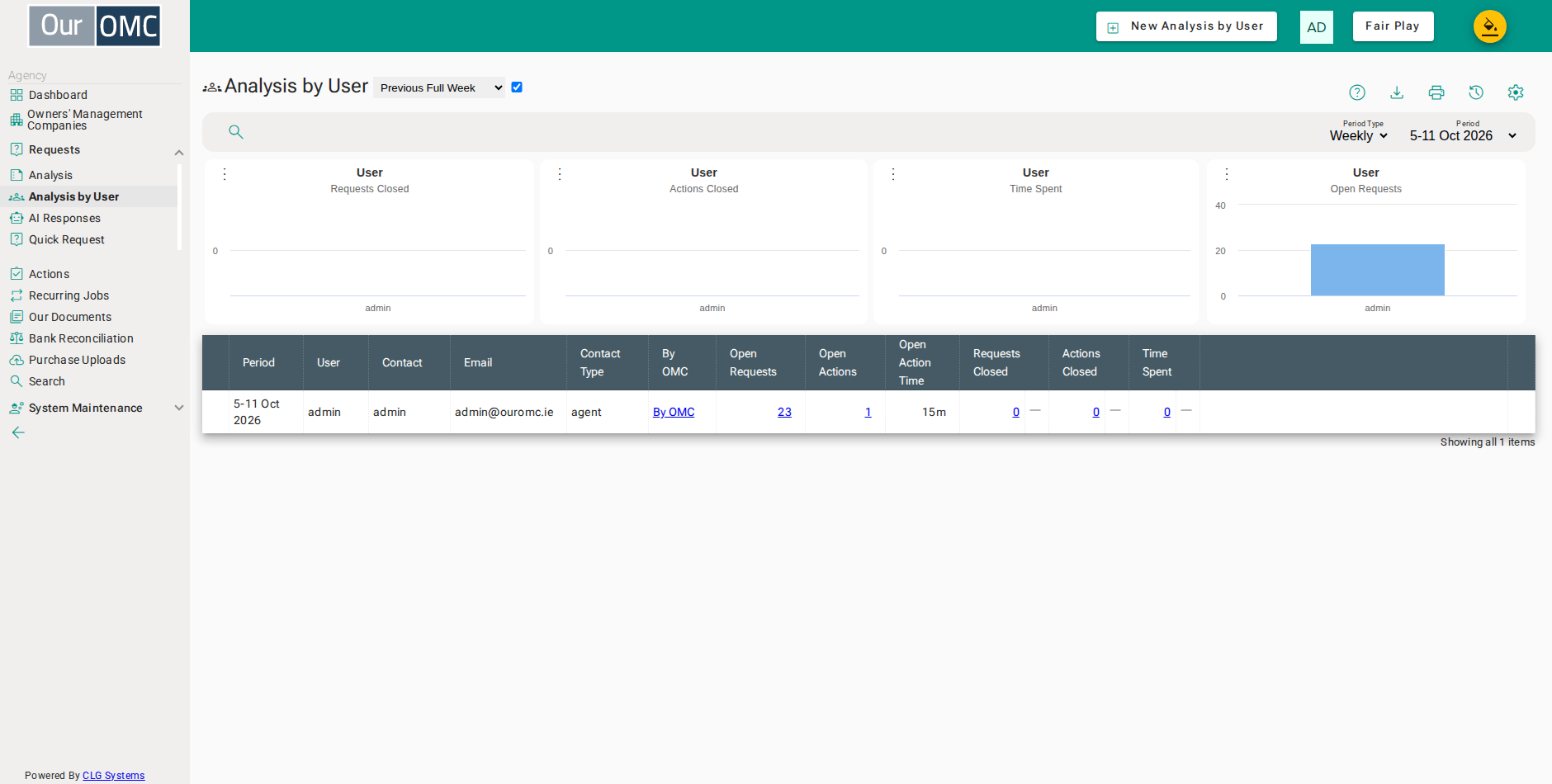
The charts at the top compare users (or, for one user, their OMCs) by requests closed, actions closed, time spent and open requests.
| Column | Type | Description |
|---|---|---|
| Period | picklist | The week or month being analysed. Closed figures cover this period, and each trend arrow compares it with the period before. |
| User | text | The login name of the user. Users outside your agency, such as an OMC director who closed a request, are combined into one "Other users" row. |
| Contact | text | The user's name as recorded on their contact in your agency. |
| text | The email address the user logs in with. | |
| Contact Type | text | The type of contact the user is in your agency, such as staff or director. The list is grouped by this. |
| By OMC | link | Opens the same figures for this user, broken down by OMC, so you can see where their time and effort is going. |
| Open Requests | link | The number of open requests this user currently owns, across all your OMCs. Click the figure to open the list of those requests. |
| Open Actions | link | The number of actions this user owns that are not yet complete. Click the figure to open the list of those actions. |
| Open Action Time | text | The time already recorded against this user's open actions. |
| Requests Closed | link | The number of requests this user resolved during the period, whoever owned them. Click the figure to open the list of those requests. |
| requestsClosedTrend | icon | Shows whether requests closed went up, down or stayed the same compared with the previous period. Hover over the arrow to see the previous figure and the percentage change. |
| Actions Closed | link | The number of actions this user completed during the period, whoever owned them. Click the figure to open the list of those actions. |
| actionsClosedTrend | icon | Shows whether actions closed went up, down or stayed the same compared with the previous period. Hover over the arrow to see the previous figure and the percentage change. |
| Time Spent | link | The total time recorded on the actions this user completed during the period. For a week, click it to see the time day by day for each OMC; for a month, it opens the list of those actions. |
| timeSpentTrend | icon | Shows whether time spent went up, down or stayed the same compared with the previous period. Hover over the arrow to see the previous figure and the percentage change. |
| text | Visual spacing column. |
Choose the previous full week or month for a like-for-like comparison with the one before it. The current week or month to date is still in progress, so its comparison is only a guide. You can also pick any recent week or month from the period filter.
| View | Shows |
|---|---|
| Previous Full Week | Work by user for the last full week, compared with the week before it |
| Current Week To Date | Work by user so far this week, compared with the whole of last week |
| Previous Full Month | Work by user for the last full month, compared with the month before it |
| Current Month To Date | Work by user so far this month, compared with the whole of last month |